When I tell people I'm building a reusable starter shell for iOS apps, it sounds like a new idea. For me, it isn't. I picked up the habit on a different platform, and I'm only now applying it to a different device.
At the centerAt DocPoint, I build Microsoft Power Platform solutions for federal and public-sector organizations. I can't name them, which is normal in that line of work, but I can describe how the work is shaped. At the center is a shell Power App: a standard set of screens built to meet Section 508 accessibility requirements, with custom code added only where a particular process needs it.
That sentence contains three decisions. I think all three transfer.
Decision one: standard screens
Every app built from the shell starts with the same screens, laid out the same way. That sounds dull, and it is, on purpose. Nobody at an agency wants to learn a new navigation pattern for every internal tool. A team that's been trained on one app can pick up the next.
The practical benefit for me is that a screen is a known quantity. I'm not rediscovering how it behaves each time. The creative work goes into the one thing that is different about this client's process.
Decision two: accessibility belongs in the foundation
Section 508 is the federal requirement that technology be usable by people with disabilities. In public-sector work it isn't optional, and it isn't a polish step at the end; you retrofit it, you find the problems late, in every screen, all at once.
If it's built into the shell, each new screen inherits it. And when a problem turns up in a shared component, you fix it in one place. That's the strongest argument I know for templates, and it has nothing to do with speed. A good shell doesn't just save time. It makes the right behavior the default.
Decision three: custom code at the edges
Some processes don't fit the standard parts. When that happens, custom code is the right answer. The discipline is keeping it at the edges, so the foundation stays clean and the custom parts are easy to see, review, and maintain. A shell that gets modified in the middle for every client stops being a shell.
What carries over
IosShell follows the same three rules: a standard chassis of the parts every app needs, shared components that carry the important properties, and a module per kind of app, where the custom work lives.
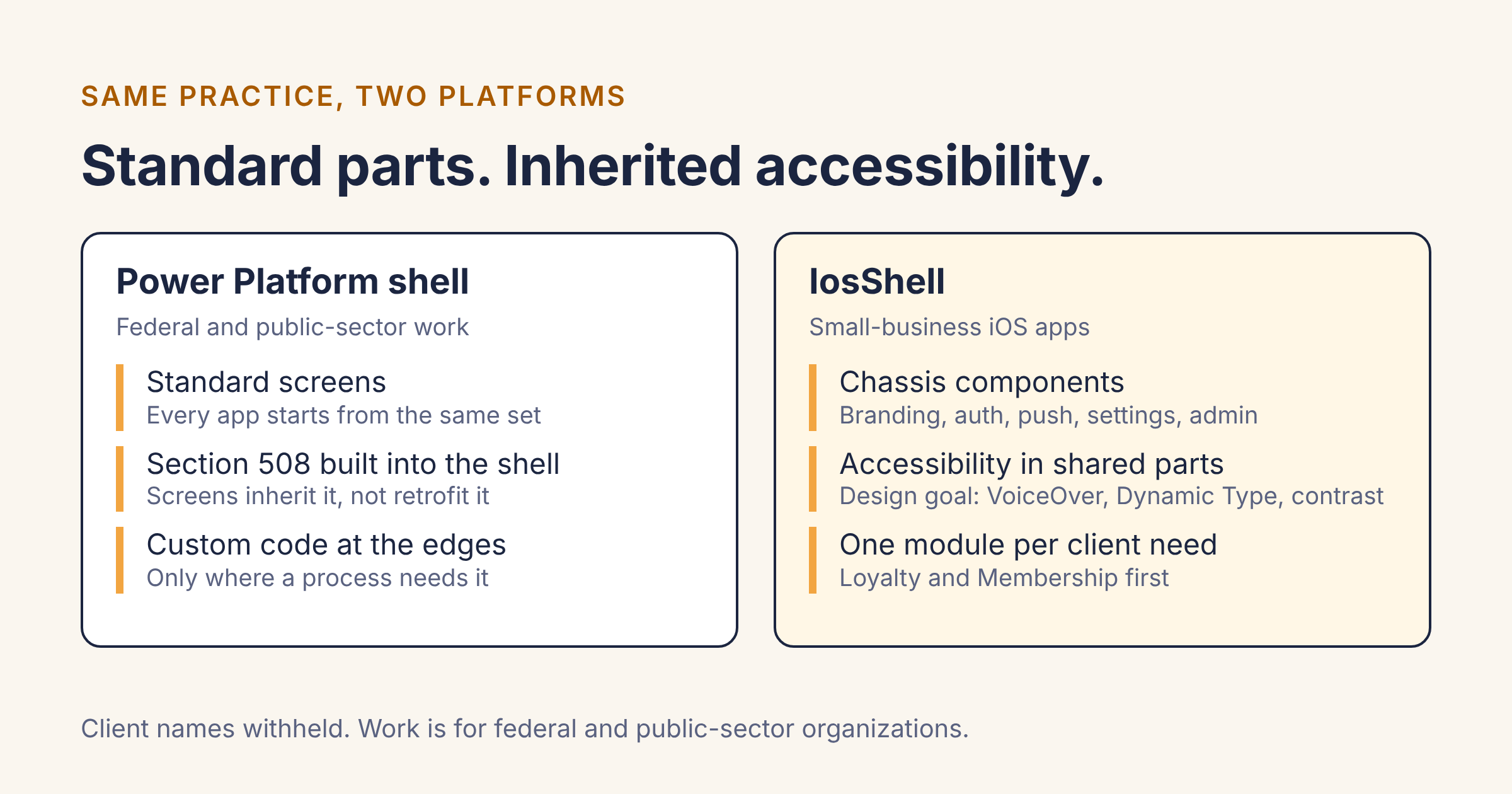
I want to be careful here, because the second rule is a goal for IosShell, not something I've finished. Accessibility isn't a line in the first-build scope yet. I intend to make it one: VoiceOver labels, Dynamic Type, contrast, and touch target sizes handled once, in the shared components, so every app built from the shell starts from a sound baseline. I'll write about how that goes, including where it's harder than it looks.
The two platforms differ in a real way. A Power Platform solution has packaging and versioning. Swift code doesn't, so making the shell genuinely reusable means thinking about how the components are packaged. That's the next thing I'm working through.
Why I'm telling you this
If you're ever weighing a native app, the point is that I don't treat the foundation as an afterthought. I've spent years working where the foundation gets audited.
If you want a native iOS app built with accessibility in mind from the start, you can reach me at [email protected].